Robotic Lawn Mower Trends 2026: Wire-Free and AI Mowers
The biggest robotic lawn mower trends for 2026 are wire-free navigation, satellite RTK positioning, and mowers that dock and charge themselves without a boundary cable. Units with vision cameras and AI obstacle detection are moving from premium models into mid-range prices.
Three things change this answer: lawn size and shape, renting versus owning, and GPS-blocking trees or walls.
Who’s reading about robotic mower trends

Three kinds of readers land here. The first already owns a robotic mower and wants to know if this year’s models make theirs obsolete. The second is shopping and trying to time a purchase — should they buy now or wait for the next generation? The third is a tech writer, installer, or reseller tracking where the category is heading.
This page serves the second reader best: someone buying in the next 6-12 months. If you’re an installer pricing commercial jobs, you need dealer spec sheets, not this. If you just want to know whether a robot saves you time, any current model answers that.
What actually decides the outcome
Satellite RTK accuracy decides everything. RTK uses a fixed base station plus satellite signals to hold position within a few centimeters. Check the spec sheet for “RTK” or “GNSS with base station” before anything else.
Lawn complexity matters more than lawn size. A flat, open 5,000 square feet is easier than a 2,000-square-foot yard with a swing set, flower beds, and a narrow side path. Complex shapes need vision cameras or ultrasonic sensors, which cost more.
Tree cover is the one people get wrong most often. Dense canopy blocks satellite signals, and RTK mowers slow down, stop, or lose position under it. Walk your lawn at midday and note how much is shaded — if more than a third is under trees, satellite-only models will struggle.
Slope limits are published per model, usually as a percentage.
Charging and docking behavior decides how hands-off the mower really is. Some models return to charge at a set battery percentage; others finish the zone first.
Setting up a wire-free mower
- Map your lawn boundary once. Walk the perimeter with the mower in mapping mode, keeping 6-12 inches from walls and beds. The app shows a live map — confirm the outline closes before saving.
- Place the RTK base station where it sees open sky. Mount it on a roof or pole with a clear, unobstructed view of the sky. A base station under a tree loses the fix that the mower needs.
- Mark no-go zones in the app. Add each flower bed, pond, and pet area as a separate zone. Draw each no-go zone to match the actual bed, pond, or pet area boundary.
- Set a cutting schedule for 2-3 sessions per week. Short, frequent cuts keep clippings small enough to disappear into the turf. One long weekly session leaves visible clumps.
- Set cutting height to the top third of your grass. For a 3-inch lawn, cut at 2 inches. Cutting lower stresses the grass and invites weeds.
- Run a full test cycle while you watch. Stay outside for the first complete run. Note any spot the mower skips or bumps into twice.
- Adjust the map, not the schedule, when it misses spots. Re-draw the zone edge rather than adding cutting time. More passes don’t fix a bad boundary.
- Check the dock alignment after the first week. The mower should slide in on the first try every time. If it takes two or three attempts, move the dock 6 inches.
The judgement call is when to stop tweaking. Chasing the last strip usually means the map is fine and the grass is just uneven.
If your lawn has a slope over 25%, a retaining wall, or a drop-off near water, stop here and hire a landscape contractor who installs robotic systems. That’s not a DIY job.
How the main options compare
| Your situation | What to do | What it takes | Watch for |
|---|---|---|---|
| Flat lawn under 5,000 sq ft | Buy a wire-free RTK model | 1-2 hours setup | Base station placement |
| Heavy tree cover | Choose a vision-camera model | Higher price | Slower cutting speed |
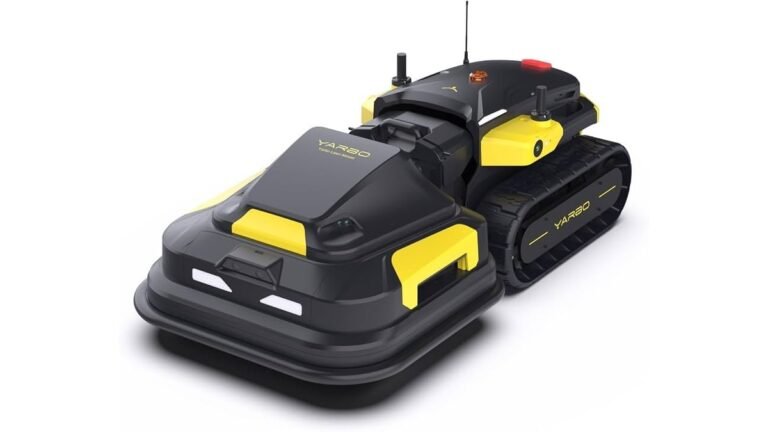
| Slopes over 25% | Use a tracked or AWD model | Pro install advised | Wheel slip, missed strips |
| Small yard under 1,500 sq ft | Consider a basic wired model | Half-day install | Wire breaks over time |
| Rental property | Buy a wired model | Easy to relocate | Landlord approval |
| Multiple lawn zones | Pick a model with multi-zone mapping | 2-3 hours setup | Zone overlap errors |
What separates a good setup from a bad one

Preparation before the first run
Experienced owners clear the lawn before mapping: sticks, toys, fallen fruit, and dog waste all cause false obstacles that get baked into the map. They also mow once with a regular mower at the target height first, so the robot starts from an even base.
What to check during the first month
Watch the app’s coverage map weekly for the first month. Two or more “stuck” notifications in a week means something on the lawn is catching the mower — find it and fix the map. Owners who ignore this end up with a robot that spends more time beeping for help than cutting.
What goes wrong, and how to fix it
Most problems trace back to the map, the dock, or the signal — not the mower itself.
| What you notice | What it usually means | What to do first | How to stop it happening again |
|---|---|---|---|
| Mower stops under trees | Lost satellite fix | Move base station higher | Add vision-camera model |
| Skips the same strip | Map boundary error | Re-draw that zone edge | Check map after edits |
| Won’t dock on first try | Dock misaligned | Shift dock 6 inches | Level the dock ground |
| Cuts unevenly | Blades dull or worn | Replace blades | Check blades monthly |
| Stuck on a root or toy | Obstacle in path | Remove it, re-map | Clear lawn before cycles |
| App shows “no signal” | Wi-Fi too weak | Add a mesh node | Check coverage at dock |
The rules and standards that apply
Safety standards for robotic mowers come from the International Electrotechnical Commission (IEC 60335-2-107), which covers battery mowers and robotic units. In the US, the Consumer Product Safety Commission (CPSC) enforces general product safety rules, and UL 60335-2-107 covers robotic battery mowers. For battery safety, UL 2595 applies to battery-powered tools.
Radio equipment rules differ by country. In the US, the FCC sets the rules for the radio equipment these mowers use. In the EU, CE marking covers the same ground. Check the model’s compliance label before buying from an overseas seller — an unmarked unit may not be legal to operate where you live.
What it really costs you
Budget for three numbers: the mower, the install, and the running cost. A wire-free RTK model costs more than a wired one, but you skip the cost of burying boundary wire, which is inexpensive relative to the alternative if you pay someone.
Running costs are small but real: replacement blades, and electricity to charge. Blades are the biggest recurring item.
The hidden cost is your time in month one. Expect 2-4 hours of setup, mapping, and tweaking before the mower runs clean.
Keeping it running after setup
Once the mower is dialed in, the work drops to almost nothing. Clean the charging contacts monthly with a dry cloth — dirty contacts cause failed docks. Check the blades every few weeks; nicked or bent blades tear grass instead of cutting it, and torn tips turn brown.
Watch for a slow drift in coverage. If your mower’s coverage has clearly dropped from where it started, the map needs a refresh, not a new mower. Re-run the mapping pass in spring after winter growth changes the lawn shape. Store the base station indoors during freezing months if the manufacturer recommends it.
When a robotic mower isn’t the right call

Skip a robotic mower if your lawn is smaller than about 1,000 square feet — a push mower takes 10 minutes and costs far less. Skip it if your yard is mostly steep slope, dense beds, or gravel; the robot will spend more time stuck than cutting.
For lawns with slopes over 30%, drop-offs, or commercial-grade acreage, hire a landscape contractor who installs robotic systems. That work needs site assessment and sometimes permits.
Frequently asked questions
Do robotic mowers work without a boundary wire in 2026?
Yes. RTK and vision-based models cut without any buried wire. They use satellite positioning or cameras to stay inside your lawn. Setup takes longer, but there’s no wire to break or repair.
How long does a robotic mower battery last?
Most lithium-ion packs last a limited number of years with normal use, depending on cycle frequency and temperature. Check your model’s manual for the exact rating. Batteries are user-replaceable on most current models.
Is it safe to leave a robotic mower running at night?
Yes, if the model has a PIN lock and lift/tilt sensors. Most current models stop blades within a second of being lifted. Keep pets and children away during scheduled runs anyway.
What happens if my robotic mower gets stolen?
Most 2026 models include GPS tracking and app alerts if the mower leaves its zone. Some brands offer theft recovery. Check your homeowner’s or renter’s insurance policy — many cover it under outdoor equipment.
Can a robotic mower handle wet grass?
It can cut damp grass, but wet clippings clump and clog the deck. Wait until the lawn dries, or run shorter sessions. Rain sensors on most models delay the schedule automatically.
How often do I need to replace the blades?
Every 4-8 weeks during growing season, depending on lawn size and how often you mow. Dull blades tear grass and leave brown tips. Check the manufacturer’s recommendation for your specific model.
Does a robotic mower need Wi-Fi?
Yes for app control, scheduling, and software updates. RTK models also need a clear satellite view. If your yard has weak Wi-Fi, add a mesh node near the dock.
Will a robotic mower replace my regular mower?
For most lawns under half an acre, yes — the robot handles weekly cuts. Keep a regular mower for the first cut of spring and for edges the robot can’t reach.
Your first move
Pick your lawn’s hardest feature — slope, shade, or narrow path — and check whether the model you’re considering handles it. Expect full coverage within a week of setup. If the mower gets stuck more than twice a week after that, stop adjusting and call the manufacturer’s support line.

Daniel Carter is a home improvement specialist and tool researcher with years of experience studying power tools, hand tools, workshop equipment, outdoor gear, and DIY projects. At HomeToolWorld, he researches products, compares features, reviews manufacturer specifications, and creates practical buying guides to help homeowners, DIY enthusiasts, and professionals make informed decisions. His goal is to provide accurate, easy-to-understand, and trustworthy content based on careful research and real-world applications.